

Whether your device supports eSIM depends mainly on whether the manufacturer has built this feature into the device. However, some countries and regions may release device versions that do not support eSIM. Additionally, even if the device itself supports eSIM, your carrier may not have enabled this feature at the time of purchase.
Want to know if your iOS device supports eSIM? Follow the steps below. Please note that these methods may vary by device and may not be universally applicable. The safest approach is to consult your device manufacturer, supplier, or primary carrier directly.
I. iPhone Device Compatibility Check
Follow these steps to check if your iPhone supports eSIM:
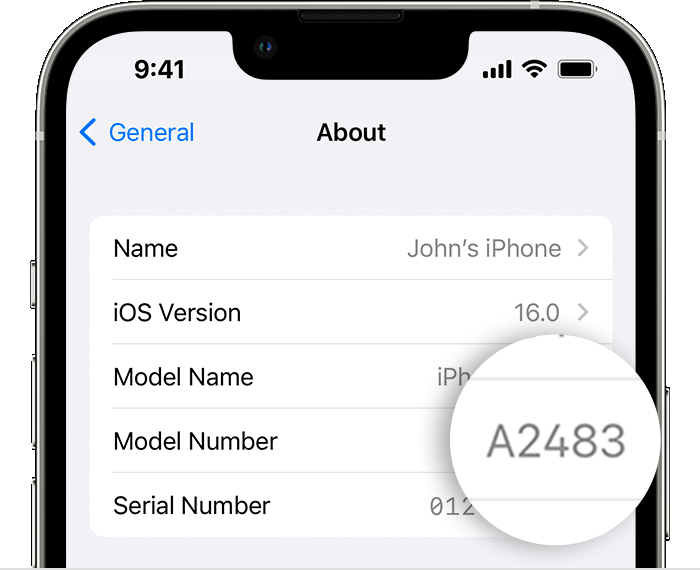
If your iPhone model is not from Mainland China, Hong Kong, or Macau, your device should be eSIM compatible. Currently, iPhones sold in Mainland China do not support eSIM. Next, follow the steps below to determine if your iPhone is carrier-locked or unlocked.

II. iPad Device Compatibility Check
The steps to check iPad are similar to iPhone. Please follow the steps below:

Just like iPhone, if the model does not match any version from Mainland China, Hong Kong, or Macau, then as long as your device supports cellular functionality, it should be eSIM compatible.
III. Still Have Questions?
If you are still unsure, remember to consult your device manufacturer, supplier, or primary carrier to confirm eSIM functionality.
If you have any questions, feel free to contact the ShinkaRoam support team at [email protected]. We are happy to help!
Ensuring your device is eSIM compatible is the first step to starting your journey of seamless global connectivity. ShinkaRoam provides eSIM services covering 180+ countries and regions, making every trip effortless and worry-free.
— ShinkaRoam Customer Support Team
For more ShinkaRoam eSIM plan details, visit the ShinkaRoam Official Website.

0 comments